
AS BitLocker Recovery — BitLocker Data Recovery Software
Unlock a BitLocker drive with its recovery key, password or .BEK file — also when Windows cannot — and recover the files.
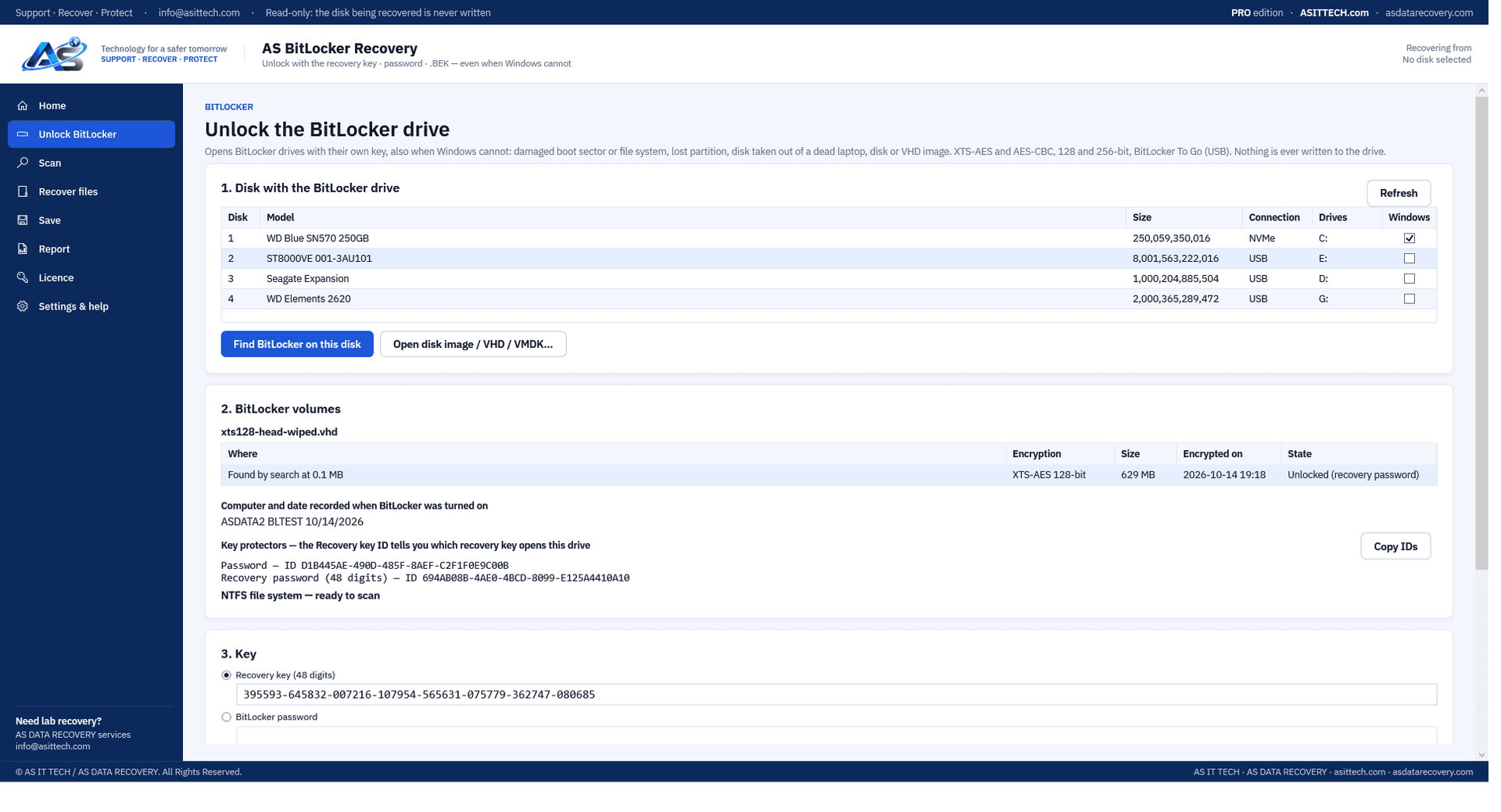
Overview
AS BitLocker Recovery opens BitLocker drives that Windows will not open, using the drive's own key. It finds the BitLocker volume on the disk — also when the partition table or the BitLocker boot sector is damaged, by searching the whole disk for BitLocker's own metadata — shows the Recovery key ID so you know which key you need, unlocks the volume with the 48-digit recovery key, the BitLocker password or the .BEK startup key file, and decrypts it while it is read. The unlocked volume is then scanned like any other drive: present and deleted files with their names and folders, damaged or formatted file systems, and files found by their content. The drive is only ever read; nothing is written to it. BitLocker cannot be opened without one of its keys — no program can do that, and this one does not pretend to.
Physically failed media and complex incidents need a service engagement.
Encrypted drive recovery servicesFeatures
- Unlock with the 48-digit recovery key, the BitLocker password or the .BEK startup key file
- Drives whose BitLocker protection was suspended open without a key
- Finds BitLocker volumes when the partition table or boot sector is damaged (searches the whole disk)
- Shows the computer name, date and Recovery key ID recorded when BitLocker was turned on
- Finds saved "BitLocker Recovery Key" .txt files and .BEK files on a USB stick or drive, and tries each one
- XTS-AES and AES-CBC, 128 and 256-bit; BitLocker To Go USB drives (NTFS, exFAT, FAT32)
- Recovers present and deleted files; deep scan for damaged file systems and files without names
- Works on disks taken out of a laptop, USB drives, and disk images (raw, VHD, VHDX, VMDK)
- Saves a decrypted copy of the whole volume for other tools
Supported environments
- Windows 10 / 11, Windows Server 2019 and later
System requirements
- 64-bit Windows; run as Administrator to read disks (image files open without)
- The drive's recovery key, password or .BEK file — a drive protected only by the TPM chip opens outside its own computer only with the recovery key
- A separate drive to save the recovered files to
- A drive with a mechanical, firmware or PCB fault needs lab repair first
Pricing
Choose an edition. Licences are delivered instantly after payment and managed in your customer portal.
Professional
One-year licence, one machine.
$350
1 activation · One-year licence, including updates during the term. Renewal is 60% of the current price.
Buy nowFree edition
The free trial finds the BitLocker volume, unlocks it with your key, scans it and lists and previews every file, so you see exactly what can be recovered before you buy. Saving the files, or a decrypted copy of the volume, needs a licence.
Download free editionWindows installer, digitally signed by Srinivasan Krishnappa (AS Data Recovery). A new release can show Chrome's “uncommon download” warning until enough people have downloaded it — choose Keep. If Windows SmartScreen appears, click More info → Run anyway.
Documentation and support
User guide, activation instructions and release notes. Licensed customers can open support tickets from the portal.
Frequently asked questions
Can it open BitLocker without the recovery key?
No. BitLocker encryption cannot be broken, and the TPM chip releases the key only inside the original computer. You need the 48-digit recovery key, the BitLocker password or the .BEK startup key file. The program shows the Recovery key ID so you can find the right key: in the owner's Microsoft account (aka.ms/myrecoverykey), the company's Entra ID, Intune or Active Directory, a printout, or a saved .txt file.
Windows asks for the recovery key and then says it is wrong, or the drive shows as RAW. Can this help?
Yes, when the key is right but the drive is damaged: a damaged BitLocker boot sector, partition entry or file system stops Windows from opening it. The program finds the BitLocker metadata itself, unlocks the volume with the key, and recovers the files from the damaged file system.
The laptop is dead. Can I recover the files from its drive?
Yes, if you have the recovery key. Take the drive out, connect it to a working Windows computer (USB adapter or dock), choose the disk in the program, enter the recovery key and scan.
Does it recover deleted files from a BitLocker drive?
Yes. After unlocking, the volume is scanned like any other: deleted files with their names where the file system still records them, and a deep scan finds files by their content.
Is the drive changed?
No. The drive is only read; decryption happens in memory as the data is read. Recovered files are saved to a different drive.
How do I activate after buying?
Your licence key (ASBL-…) arrives by e-mail and in your account. In the program open Licence, enter the key under Activate online and click Activate.
Prefer us to recover it for you?
Our lab has already solved 656+ ransomware and data recovery cases. Send us the files instead of running the software yourself: we tell you exactly what we can recover after a free assessment, and if we cannot recover your data, you do not pay.
- ✓ Free assessment before you pay anything
- ✓ No data, no charge
- ✓ NDA on request
Email: info [at] asittech.com · Mon–Fri, 9:00–18:00 IST