
AS Data Recovery — Data Recovery Software for Windows
Recover deleted, formatted and lost files and partitions from hard disks, SSDs, USB drives, memory cards, disk images and virtual disks.
Overview
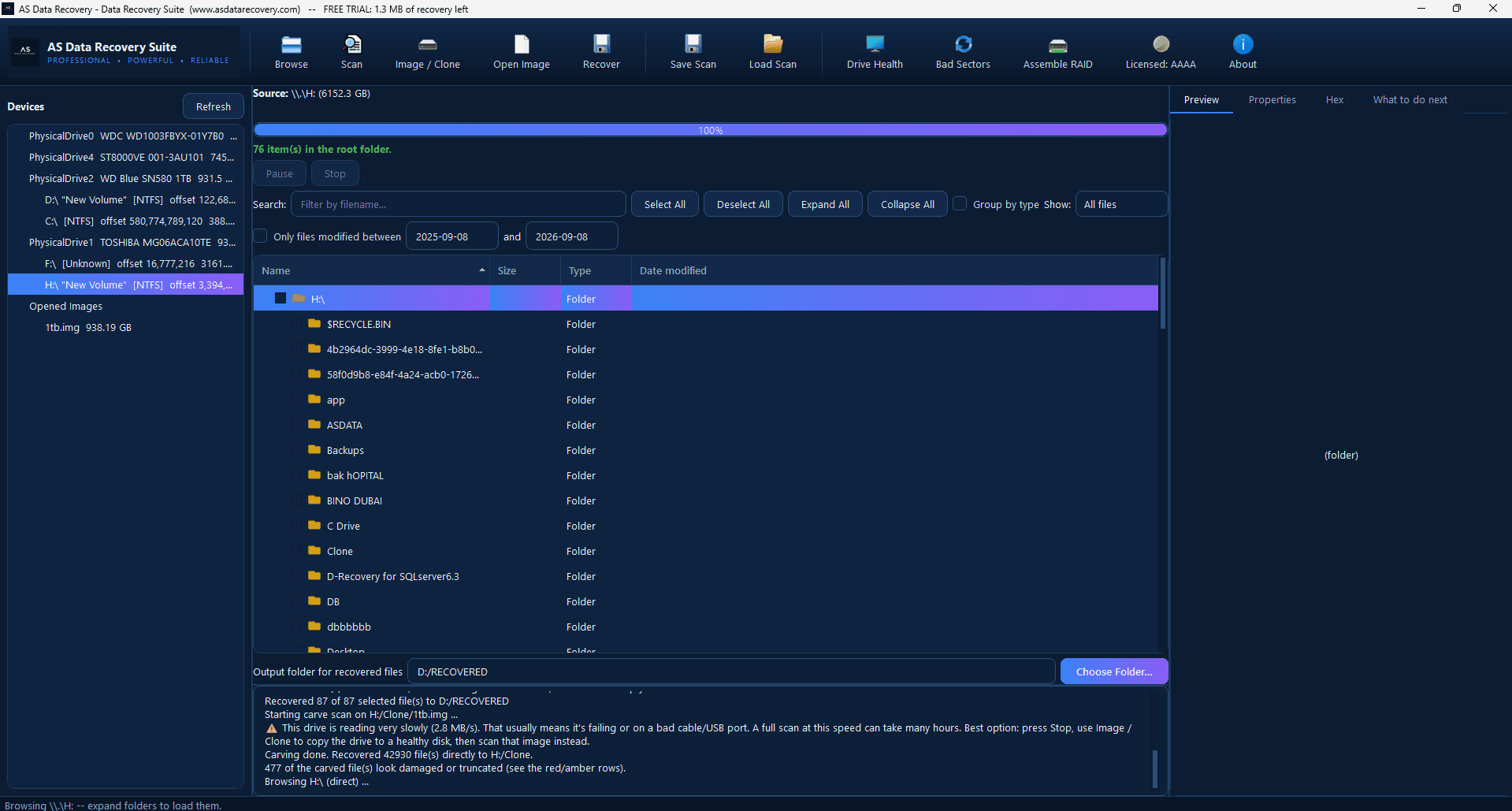
AS Data Recovery reads the drive strictly read-only and shows exactly what can be recovered before you buy. A quick scan reads the NTFS, FAT32 and exFAT file systems — present and deleted files with their names and folders — and grades every deleted file by whether its space has since been reused, so you know which files will come back intact. A deep scan reads the whole drive once: it finds lost and deleted partitions (even when the boot sector is damaged), brings back files from before a quick format by their surviving file records, and finds 30+ file types by their content when no name is left — photos and camera RAW, videos, audio, Word / Excel / PowerPoint (old and new formats), PDF, archives and databases. Recovered files are saved to another disk with a SHA-256 list of every file. It works on drives the system can already detect and read; a drive that isn't detected, clicks or grinds needs lab recovery first.
Physically failed media and complex incidents need a service engagement.
Data recovery servicesFeatures
- Quick scan: present and deleted files from NTFS, FAT32 and exFAT, with names, folders and dates
- Every deleted file graded: intact, partly overwritten or overwritten
- Formatted NTFS drives: old files back with their names from surviving file records
- Lost and deleted partitions found by their boot sectors, including the NTFS backup boot sector
- Deep scan by content: photos, camera RAW, videos, audio, Office, PDF, archives, databases (30+ types)
- Windows-compressed (NTFS) and fragmented files recovered correctly
- Disk images (IMG, RAW, DD, split .001) and virtual disks (VHD, VHDX, VMDK)
- Preview before saving; stop a deep scan any time and keep what was found; never saves onto the source disk
Supported environments
- Windows 10 / 11, Windows Server 2016 and later (64-bit)
- Internal and external HDD, SSD, NVMe, USB drives, SD / microSD / CF cards
- Disk image files (IMG, RAW, DD, split images) and virtual disks (VHD, VHDX, VMDK)
System requirements
- 64-bit Windows; no .NET install needed; administrator rights to read disks
- A separate destination drive for recovered files
- The drive must be detected by Windows and readable — a drive with a mechanical, firmware or PCB fault needs lab repair first
- Mac (HFS+ / APFS) and Linux (ext4) file systems are not read yet; files on them can still be found by the deep scan by content
Pricing
Choose an edition. Licences are delivered instantly after payment and managed in your customer portal.
Professional
Full recovery features for a single technician or organization.
$150
1 activation · One-year licence, including updates during the term. Renewal is 60% of the current price.
Buy nowEnterprise
Everything in Professional, plus higher activation limits, commercial recovery use and priority support.
$650
5 activations · One-year licence, including updates during the term. Renewal is 60% of the current price.
Buy nowFree edition
The free edition has no time limit: every scan, the full list of recoverable files and preview. Saving recovered files requires a Professional or Enterprise licence. Activate it in the program with the licence key from your order.
Download free editionWindows installer, digitally signed by Srinivasan Krishnappa (AS Data Recovery). A new release can show Chrome's “uncommon download” warning until enough people have downloaded it — choose Keep. If Windows SmartScreen appears, click More info → Run anyway.
Documentation and support
User guide, activation instructions and release notes. Licensed customers can open support tickets from the portal.
Frequently asked questions
Is this deleted file recovery software, hard drive recovery software or partition recovery software?
All three. As deleted file recovery software it lists deleted files with their names and grades each one as intact, partly overwritten or overwritten. As hard drive recovery software it scans hard disks, SSDs, USB drives and memory cards, also after formatting. As partition recovery software it finds lost and deleted partitions by their boot sectors.
What should I look for in hard drive recovery software?
Three things: it must open the drive read-only, show you what it can recover before you pay, and tell you which deleted files are intact and which were partly overwritten. AS Data Recovery does all three, and its free edition runs every scan and preview. Any hard drive recovery software only works on a drive Windows detects and can read: if the hard disk clicks, is not detected or keeps disconnecting, stop and get it imaged in a lab first, because scanning a failing disk can make it worse.
Does it work as laptop data recovery software?
Yes. It runs on any 64-bit Windows 10 or 11 PC or laptop. To recover files from the laptop's own disk, the safest way is to take the disk out and connect it to another PC with a USB adapter, or at least install the program and save the recovered files on a different drive, so nothing new is written over the deleted files.
Can it recover permanently deleted files (Shift+Delete or an emptied Recycle Bin)?
Usually, if the space has not been reused. Windows only marks the space of a permanently deleted file as free. The quick scan lists such files with their names and grades each one as intact, partly overwritten or overwritten, so you know before recovering which ones will open.
Does it work as USB drive, pen drive and SD card recovery software?
Yes. USB flash drives, pen drives, external hard disks and SD, microSD and CF cards are scanned like any other drive, including after a quick format. Photos and videos from cameras are also found by their content, including camera RAW formats.
Is it data recovery software for Windows 11 and Windows 10?
Yes. It runs on 64-bit Windows 10 and 11 and on Windows Server 2016 and later. It reads NTFS, FAT32 and exFAT drives; Mac and Linux file systems are not read yet, although files on them can still be found by content in the deep scan.
Is the software safe to run on the drive I lost files from?
It opens the source drive read-only and never saves recovered files onto it. To keep the risk lowest, install the program on a different drive from the one you are recovering, or connect the affected drive to another computer and scan it there.
What does data recovery software actually do?
It scans a drive the operating system can already detect and read, reconstructs what the file system still records about deleted files, finds lost partitions and files by their content, and lets you preview and copy recoverable files to a separate destination. It never writes to the source drive.
Is AS Data Recovery free to try?
Yes. The free edition has no time limit: it runs every scan and previews every file, so you see exactly what can be recovered before you buy a licence to save them.
Can it recover files after formatting?
Often, yes. A quick format writes a new, small file table; the old file records behind it usually survive, and the deep scan brings those files back with their names. Files whose records were overwritten are still found by their content (photos, documents, videos and more), without their original names.
How long does a deep scan take?
It reads every byte of the drive once: about 3 hours per terabyte on a USB hard disk, much less on an internal SSD. You can stop it at any time and keep everything found so far.
Does it work on SSDs the same way as hard drives?
It scans SSDs the same way, but SSDs run TRIM, which can erase deleted data soon after deletion. Stop using the SSD and scan as soon as possible.
What's the difference between data recovery software and a data recovery service?
Software works only on drives the system can detect and read. A drive that isn't detected, makes clicking or grinding noises, or has a firmware or PCB fault needs to be repaired in a lab first — no recovery software can scan a drive the system can't read.
How do I activate after buying?
Your licence key (ASDR-…) arrives by e-mail and in your account. In the program open Licence, enter the key under Activate online and click Activate. Removing the licence in the program releases the computer so you can move it.
Prefer us to recover it for you?
Our lab has already solved 656+ ransomware and data recovery cases. Send us the files instead of running the software yourself: we tell you exactly what we can recover after a free assessment, and if we cannot recover your data, you do not pay.
- ✓ Free assessment before you pay anything
- ✓ No data, no charge
- ✓ NDA on request
Email: info [at] asittech.com · Mon–Fri, 9:00–18:00 IST