
AS VMware Recovery — VMware VMDK Recovery Software
Recover files from VMware VMDK and Hyper-V VHD/VHDX virtual disks — snapshot chains, broken descriptors and ransomware-damaged disks included.
Overview
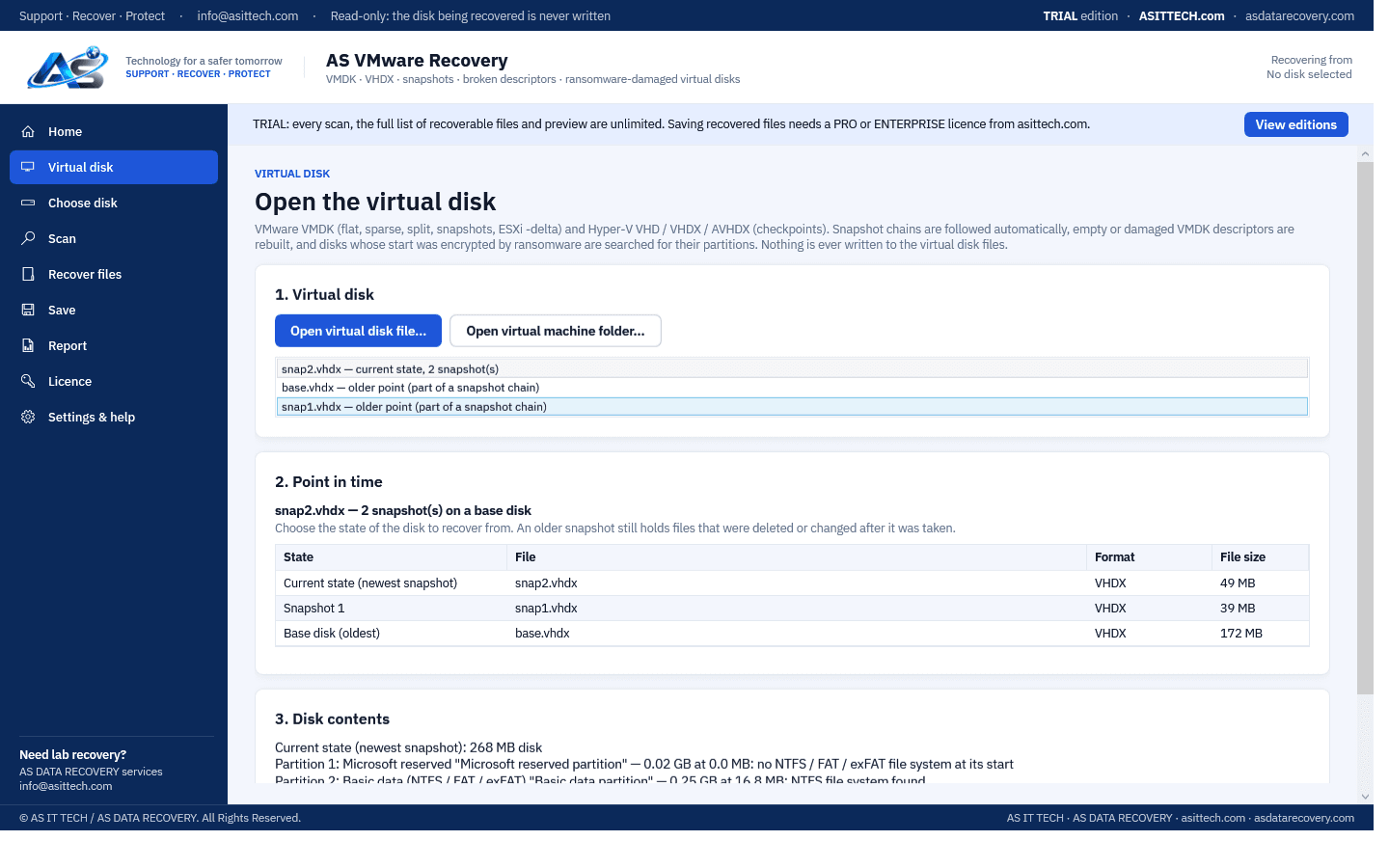
AS VMware Recovery opens VMware and Hyper-V virtual disk files directly, on any Windows PC, without an ESXi or Hyper-V host. It follows snapshot and checkpoint chains automatically — even when the files were renamed or moved — and lets you open the disk at any point in time: an older snapshot still holds files that were deleted or changed after it was taken. A VMDK whose descriptor is empty or damaged is rebuilt from its data file. When ransomware or a wipe destroyed the start of a virtual disk, the program restores the partitions from the backup GPT table and backup boot sectors and reads the file table from its $MFTMirr copy, then recovers the files with the AS Data Recovery engine (deleted files, formatted volumes, lost partitions, deep scan by file content). The virtual disk files are only ever read.
Physically failed media and complex incidents need a service engagement.
VMware data recovery servicesFeatures
- VMware VMDK: flat (-flat.vmdk), monolithic and split sparse, Workstation snapshots
- Hyper-V VHD, VHDX and AVHDX, including differencing disks and checkpoint chains
- Snapshot chains followed automatically; the parent is found by its identity when files were renamed or moved
- Recover from any point in time: the current state or any older snapshot
- Empty or damaged VMDK descriptor rebuilt from the -flat / -sNNN / -delta data file, and saved for VMware
- Ransomware-damaged virtual disks: partitions restored from the backup GPT and backup boot sectors, file table from $MFTMirr
- File recovery inside the disk: NTFS, FAT32 and exFAT, deleted files, formatted volumes, lost partitions, deep scan by content
- Save the virtual disk as one raw image with its snapshots merged
Supported environments
- Windows 10 / 11, Windows Server
- Tested on a real 598 GB server -flat.vmdk with its first 64 MB destroyed: 843,904 of 844,121 files recovered with names and folders
- Virtual disks from VMware ESXi, Workstation and Player, and Microsoft Hyper-V (copied to the Windows PC)
System requirements
- 64-bit Windows
- The virtual disk files (copied from the datastore or Hyper-V host)
- Destination storage for recovered data
- Not supported in this version: ESXi SEsparse snapshots (-sesparse.vmdk, VMFS 6) and reading a VMFS datastore disk directly — our VMware recovery service handles these
- File recovery inside the guest: NTFS, FAT32 and exFAT (Windows guests); Linux guest file systems are not read by this version
Pricing
Choose an edition. Licences are delivered instantly after payment and managed in your customer portal.
Professional
Full recovery features for a single technician or organization.
$900
1 activation · One-year licence, including updates during the term. Renewal is 60% of the current price.
Buy nowEnterprise
Everything in Professional, plus higher activation limits, commercial recovery use and priority support.
Price on request
5 activations · One-year licence, including updates during the term. Renewal is 60% of the current price.
Request a quoteFree edition
The free edition has no time limit: it opens the virtual disk and its snapshots, runs every scan and previews every file. Saving recovered files and disk images requires a licence. Activate it in the program with the licence key from your order.
Download free editionWindows installer, digitally signed by Srinivasan Krishnappa (AS Data Recovery). A new release can show Chrome's “uncommon download” warning until enough people have downloaded it — choose Keep. If Windows SmartScreen appears, click More info → Run anyway.
Documentation and support
User guide, activation instructions and release notes. Licensed customers can open support tickets from the portal.
Frequently asked questions
Can it repair a VMDK file?
It repairs what most often makes a VMDK unusable. To repair a VMDK file with an empty or damaged descriptor, the descriptor is rebuilt from the -flat, -sNNN or -delta data file; broken partition tables and boot sectors inside the disk are restored from their backup copies. The files are then recovered from the disk.
Can I recover a deleted VMDK, or use it for ESXi data recovery?
For ESXi data recovery, copy the VMDK files off the datastore and open them in the program. It works on VMDK files you still have. To recover a deleted VMDK from a VMFS datastore is not something this program does yet: that is laboratory work, so contact us before anything else is written to the datastore.
Does it do VHDX recovery for Hyper-V?
Yes. For VHDX recovery the VHD, VHDX and AVHDX files are opened directly with their checkpoint chains, and files are recovered from inside. A disk can be saved as one raw image with its checkpoints merged, which is a practical way to finish an AVHDX merge that Hyper-V refuses.
How do I repair a VHDX file, or recover a deleted VHDX?
To repair a VHDX file that will not mount, open it in the free edition: partitions and the file table are restored from their backup copies where possible and the files are listed. To recover a deleted VHDX, the file must first be found on the host's disk: AS Data Recovery can scan that drive for deleted files, or send the case to our laboratory.
Do I need an ESXi or Hyper-V server?
No. Copy the virtual disk files (the .vmdk and -flat.vmdk, or the .vhdx and .avhdx files) to a Windows PC and open them in the program, or open the virtual machine's folder.
Can I recover files deleted after a snapshot was taken?
Yes. The program lists every point in time in the snapshot chain. Open the disk as of the older snapshot: files that existed then are read exactly as they were, even if they were deleted or changed later.
The .vmdk descriptor file is missing or 0 bytes. Can it still be opened?
Yes. Open the descriptor (or the -flat.vmdk). The program rebuilds the descriptor from the data file, opens the disk, and can save the repaired descriptor so VMware can use the disk again.
Does it help after ransomware?
When ransomware encrypted only the start of a virtual disk (a common pattern), the partitions come back from the backup GPT table and backup boot sectors, and the files from the rest of the disk. Data that was itself encrypted cannot be read by any software without the key.
Can it open a -flat.vmdk renamed by ESXi ransomware (.akira, .lockbit and others)?
Yes. A flat VMDK is a raw image of the disk, so the program reads it by its content whatever its name. Copy the encrypted -flat.vmdk off the datastore, keep the original untouched, and open the copy in the free edition: the scan shows which partitions and files are still readable.
What if the ransomware encrypted stripes through the whole VMDK?
Then the files whose data lay in the encrypted stripes are damaged or lost; the rest is read normally. The free scan shows how much is affected before you buy. For large disks where the file table itself was hit, our VMware recovery service can rebuild more by hand.
Can it recover a Hyper-V VHDX encrypted by ransomware?
Often in large part. When only the guest disk inside the VHDX was damaged, the program restores the partitions from their backup copies and reads the file table from its mirror, as with a VMDK. When the VHDX header and block table at the very start of the file were encrypted, Hyper-V and Windows can no longer open the file and the disk has to be rebuilt from its data blocks first; that is laboratory work by our Hyper-V recovery service. The free scan shows whether the program can open your file directly.
Does it support VMFS datastores and SEsparse snapshots?
Not in this version. Copy the VM files out of the datastore with ESXi first. For a damaged VMFS datastore or SEsparse snapshots, use our VMware recovery service.
How do I activate after buying?
Your licence key (ASVM-…) arrives by e-mail and in your account. In the program open Licence, enter the key under Activate online and click Activate.
Prefer us to recover it for you?
Our lab has already solved 656+ ransomware and data recovery cases. Send us the files instead of running the software yourself: we tell you exactly what we can recover after a free assessment, and if we cannot recover your data, you do not pay.
- ✓ Free assessment before you pay anything
- ✓ No data, no charge
- ✓ NDA on request
Email: info [at] asittech.com · Mon–Fri, 9:00–18:00 IST