
AS VBK Recovery Studio — Veeam VBK Recovery Software
Recover VMs, disks and files from damaged, incomplete and ransomware-hit Veeam backups (.vbk / .vib).
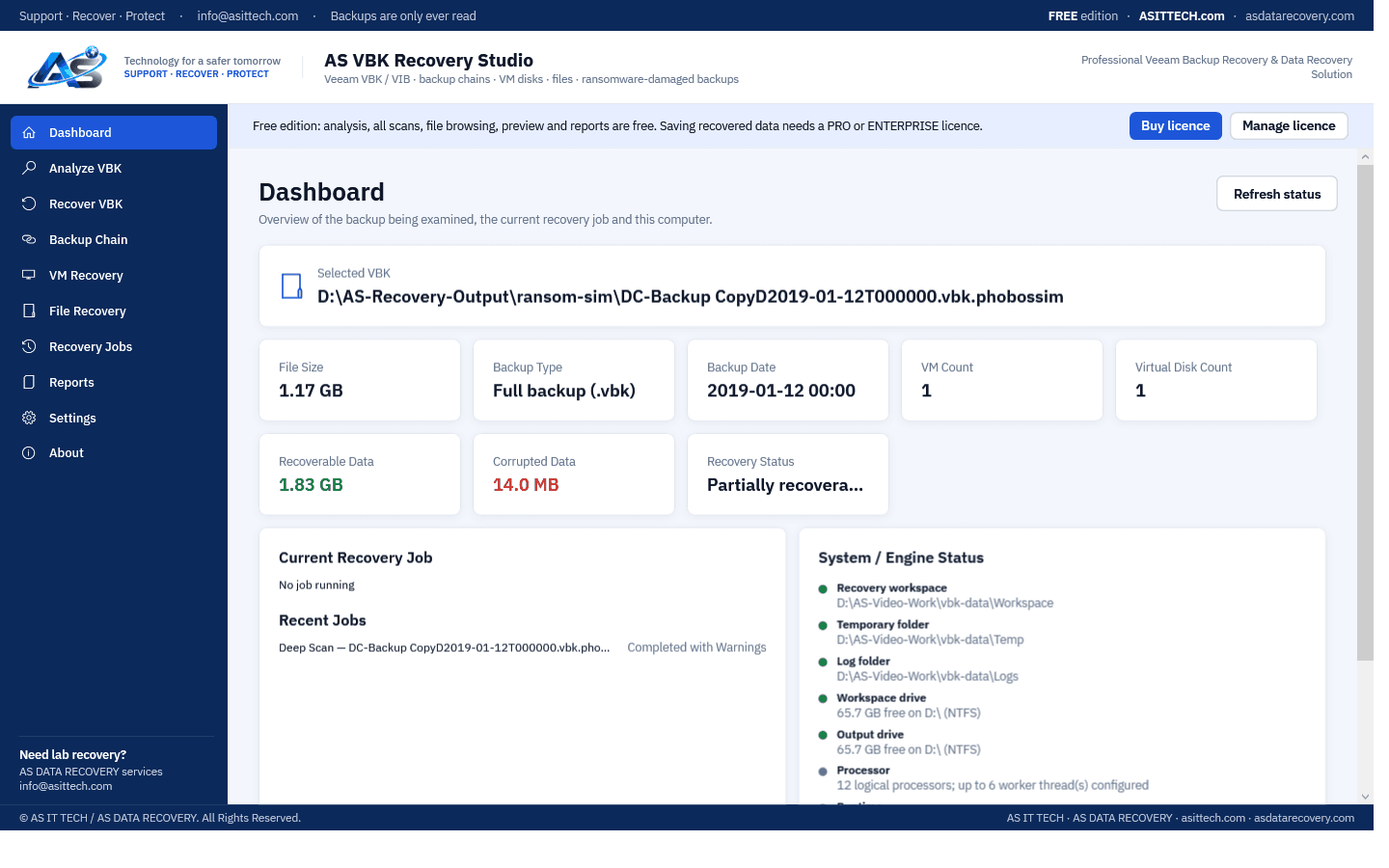
Overview
AS VBK Recovery Studio opens Veeam Backup & Replication files that Veeam itself refuses — shifted, truncated, partially written or partly encrypted by ransomware — without ever modifying the original. It repairs what it safely can in memory, verifies every data block against the backup's own checksums, rebuilds restore points from full and incremental files, exports virtual disks, and lets you browse and recover files straight from the backup. When ransomware such as Akira has destroyed the backup's metadata, it salvages intact data and carves complete files from what is still readable. Every result is reported honestly: nothing is shown as recovered unless it was read and verified.
Physically failed media and complex incidents need a service engagement.
Ransomware recovery & incident responseSee it work
Features
- Analysis of .vbk / .vib files, including damaged, shifted and truncated backups
- Rebuilds backups whose header and first metadata were encrypted by ransomware, from the metadata copies Veeam keeps deeper in the file
- Quick Scan, Deep Scan (every block verified by CRC32C and MD5) and Advanced Analysis
- Backup chain analysis: which restore points are available, missing or damaged
- VM discovery and virtual disk export as VMDK, dynamic VHDX (attach in Windows / Hyper-V), dynamic VHD, RAW or the original file
- File browsing and recovery from NTFS, FAT and exFAT volumes inside the backup, with preview
- Ransomware recovery: salvage of intact blocks and file carving when metadata is destroyed (e.g. Akira)
- Professional PDF/HTML/CSV/JSON reports with customer and case details
- Read-only by design: the original backup is never modified
Supported environments
- Windows 10 / 11, Windows Server 2016 or later (64-bit)
- Veeam Backup & Replication backups (storage format 9 verified on real backups; newer formats verified on a real Akira-encrypted backup)
- VMware (VMDK) and Hyper-V (VHDX) guests
System requirements
- 64-bit Windows; no .NET install needed
- Read access to the backup files (a local or USB copy is fastest)
- Free space for exported disks or files (exported disks are sparse on NTFS)
- Password-encrypted Veeam backups are not supported
Pricing
Choose an edition. Licences are delivered instantly after payment and managed in your customer portal.
Professional
All recovery features for one technician on one computer, for virtual disks and backup files of up to 1 TB each.
$4,300
+ 18% GST
1 computer · One-year licence, including updates during the term. Renewal is 60% of the current price. Prices plus 18% GST.
Buy nowEnterprise
Everything in Professional with no size limit, for up to five computers, with commercial recovery use and extra support from our engineers for difficult and ransomware cases.
Price on request
5 computers · One-year licence, including updates during the term. Renewal is 60% of the current price. Prices plus 18% GST.
Request a quoteFree edition
The free edition has no time limit: analysis, all scans, backup-chain analysis, file browsing and preview, and reports. Saving recovered disks and files requires a Professional or Enterprise licence. The Professional licence recovers from virtual disks and backup files of up to 1 TB each; for larger sizes please contact us at info@asittech.com. Activate it in the program with the licence key from your order.
Download free editionWindows installer, digitally signed by Srinivasan Krishnappa (AS Data Recovery). A new release can show Chrome's “uncommon download” warning until enough people have downloaded it — choose Keep. If Windows SmartScreen appears, click More info → Run anyway.
Documentation and support
User guide, activation instructions and release notes. Licensed customers can open support tickets from the portal.
Frequently asked questions
Veeam says the backup file is corrupted. Is this a VBK file repair tool?
It does not patch the VBK in place, so it is not VBK file repair in that sense. It reads the damaged backup, verifies every block and exports what is intact: whole virtual disks or single files. That works in most cases where the Veeam backup is corrupted, a restore point is missing or the chain is broken, including the message that the Veeam backup file is corrupted.
Is this a Veeam VBK extract tool?
Yes. As a Veeam VBK extract tool it takes VMs, virtual disks and files out of .vbk and .vib files without a Veeam server, also from damaged, truncated or partly encrypted backups.
Can you recover a deleted Veeam backup?
If the VBK was deleted from the repository, stop writing to that volume. To recover a deleted Veeam backup the file must first be found on the disk, which is laboratory work; once the file or its fragments are found, this program reads what is intact. Contact us before the repository is reused.
How do I recover a corrupted Veeam VBK file?
Copy the .vbk and its .vib increments to a local disk, open the .vbk in the free edition and run Quick Scan, then Deep Scan. The program shows which restore points, virtual machines and files are still readable and verifies every block. With a licence you then export the virtual disks or save the files you need.
Can I open a VBK file without Veeam Backup & Replication?
Yes. The program reads the backup files directly on any 64-bit Windows PC. It does not need a Veeam installation, the Veeam console or the configuration database, so it also works after the backup server itself was lost.
Can it repair a broken backup chain with a missing or damaged VIB?
The backup chain analysis shows which restore points are available, missing or damaged. Restore points whose full and incremental files are readable are rebuilt. A restore point that depends on an increment that is missing or destroyed cannot be completed, and the program reports that instead of guessing.
Does it open password-encrypted Veeam backups?
No. Backups encrypted with a Veeam job password are not supported. Backups encrypted afterwards by ransomware are a different case and are supported: the program measures what the ransomware left intact.
Is anything written to my backup files?
No. Backups are opened read-only, recovered data can never be saved into the backup's own folder, and existing files are never overwritten.
Can it recover a backup encrypted by ransomware?
It depends on how much the ransomware encrypted. Many families, Akira among them, encrypt only parts of large files. The program also rebuilds a backup whose header and first metadata were encrypted, from the metadata copies Veeam keeps deeper in the file: in a real Akira case it rebuilt a 466 GB server disk from a 43 GB .vbk.akira file, with 140,143 of 142,624 blocks verified. For uncompressed backups whose metadata is gone everywhere, complete files are carved from the readable data, without their names. The free edition shows which case yours is.
Can it open a .vbk.akira file or a VBK renamed by other ransomware?
Yes. The program recognises Veeam files by their content, not by their name, so a backup renamed by ransomware (.vbk.akira or any other added extension) opens like any other. Do not rename or move the originals; work on a copy.
Which ransomware families does it handle?
It does not depend on the family: it measures which parts of each backup file are still intact and recovers from those. We have used it on real Akira-encrypted backups, and on test copies encrypted the way head-encrypting (LockBit-style) and striping (Phobos-style) ransomware works. A backup that was encrypted completely cannot be recovered without the attacker's key.
What does the free edition include?
Everything except saving recovered data: analysis, Quick/Deep/Advanced scans, backup chain, VM listing, file browsing and preview, and reports. There is no time limit.
How do I activate after buying?
Your licence key (ASVB-…) arrives by e-mail and in your account. In the program open Settings > License, enter the key under Online activation and click Activate online. Removing the licence in the program releases the computer so you can move it.
Prefer us to recover it for you?
Our lab has already solved 656+ ransomware and data recovery cases. Send us the files instead of running the software yourself: we tell you exactly what we can recover after a free assessment, and if we cannot recover your data, you do not pay.
- ✓ Free assessment before you pay anything
- ✓ No data, no charge
- ✓ NDA on request
Email: info [at] asittech.com · Mon–Fri, 9:00–18:00 IST