
AS CCTV DVR Recovery
Recover CCTV footage from damaged, deleted, formatted or unreadable DVR / NVR disks, SD cards and disk images.
Overview
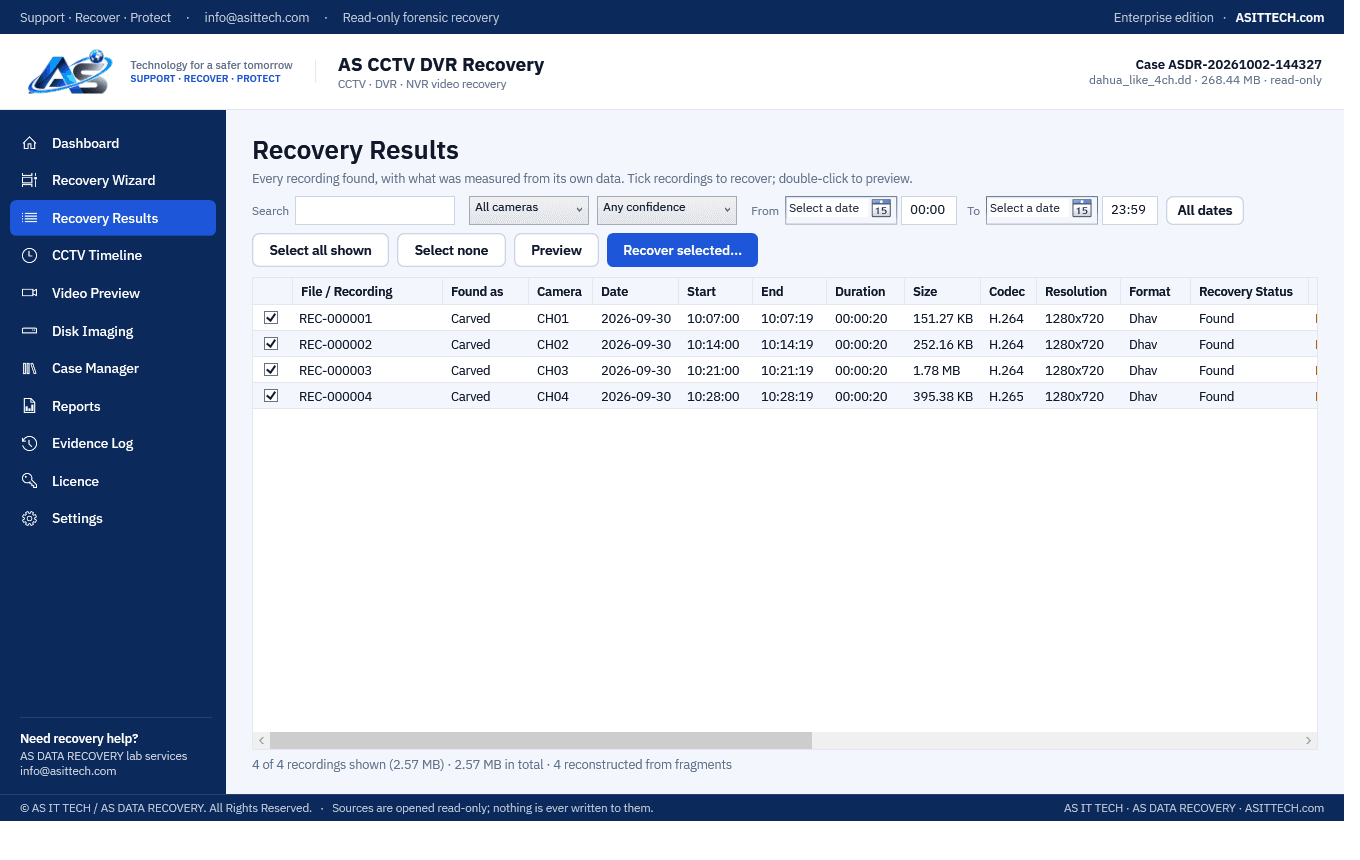
AS CCTV DVR Recovery finds surveillance recordings on recorder disks that no longer play, have been formatted or deleted, or that Windows cannot read. It opens the disk strictly read-only, reads FAT32, exFAT and NTFS volumes for named and deleted recordings, and scans every sector for MP4/MOV, AVI, MPEG-PS, MPEG-TS, Hikvision-family IMKH, Dahua-family DHAV and raw H.264/H.265 video — even where no filesystem is left. Recordings stored in scattered pieces are joined back only where the video stream itself proves they belong together. Each recording shows its camera, date and time, codec, resolution and a confidence rating; you can watch it on a CCTV timeline before recovering it as an exact copy or a playable MP4/AVI without re-encoding.
Physically failed media and complex incidents need a service engagement.
Data recovery servicesFeatures
- Physical disks (SATA/USB/NVMe), SD cards and raw/dd disk images — always opened read-only
- Quick scan of FAT32, exFAT and NTFS: live and deleted recordings with names and dates
- Deep, Signature, DVR and Custom (sector range, block size, own signatures) scans of the raw disk
- MP4/MOV, AVI, MPEG-PS, MPEG-TS, IMKH (Hikvision-family), DHAV (Dahua-family), raw H.264/H.265
- Fragmented recordings rebuilt from stream evidence; missing frames counted and reported
- CCTV timeline per camera and date, built-in player with frame step, slow/fast motion, zoom and screenshots
- Date-wise recovery; exact original copies with SHA-256 plus MP4/AVI copies without re-encoding
- Bad-sector-safe reading, forensic disk imaging (MD5/SHA-1/SHA-256, resume), case manager, evidence log and PDF reports
Supported environments
- Windows 10 / 11, Windows Server 2019 or later (64-bit)
- DVR / NVR / XVR hard disks, SD cards, USB drives, disk images
- Generic recorders storing standard video files; Hikvision- and Dahua-family stream formats
System requirements
- 64-bit Windows; no .NET install needed; administrator rights to read physical disks
- The recorder disk connected by SATA or a USB dock (SD cards via a card reader)
- A separate disk, share or NAS for recovered recordings
- H.265 preview needs Microsoft's HEVC Video Extension (recovery does not)
Pricing
Choose an edition. Licences are delivered instantly after payment and managed in your customer portal.
Professional
Recover and save recordings, MP4/AVI copies and full disk imaging, for one technician on one computer.
$200
+ 18% GST
1 computer · One-year licence, including updates during the term. Renewal is 60% of the current price. Prices plus 18% GST.
Buy nowEnterprise
Everything in Professional plus custom scans and own signatures, split images and evidence-chain tools, for up to five computers.
$350
+ 18% GST
5 computers · One-year licence, including updates during the term. Renewal is 60% of the current price. Prices plus 18% GST.
Buy nowFree edition
The free edition has no time limit: every scan, the CCTV timeline, video preview and reports. Saving recovered recordings and disk imaging require a Professional or Enterprise licence. Activate it in the program with the licence key from your order.
Download free editionWindows installer, digitally signed by Srinivasan Krishnappa (AS Data Recovery). A new release can show Chrome's “uncommon download” warning until enough people have downloaded it — choose Keep. If Windows SmartScreen appears, click More info → Run anyway.
Documentation and support
User guide, activation instructions and release notes. Licensed customers can open support tickets from the portal.
Frequently asked questions
Is this CCTV DVR recovery software for a PC?
Yes. It is CCTV DVR recovery software for a PC running Windows: take the hard disk out of the DVR or NVR, connect it to the PC, and the program scans it for recordings. Nothing is written to that disk.
Is anything written to the recorder disk?
No. The disk is opened read-only — the program has no code path that writes to a source — and recovered recordings can never be saved onto the disk being recovered.
Which recorders are supported?
Any recorder that stores standard video (MP4, AVI, MPEG-PS/TS, raw H.264/H.265) on FAT32, exFAT or NTFS, plus the Hikvision-family IMKH and Dahua-family DHAV stream formats found by scanning. The recorders' own proprietary indexes (exact recording lists, camera names) are not read yet; support for each vendor is stated in the program exactly as implemented.
Can it recover after the DVR was formatted?
Often, yes: formatting usually rewrites the recorder's index, not the video itself. The free deep scan shows exactly which recordings are still on the disk, with preview, before you buy.
What does the free edition include?
Everything except saving: all scans, the timeline, video preview and reports, with no time limit.
How do I activate after buying?
Your licence key (ASCC-…) arrives by e-mail and in your account. In the program open Licence, paste the key and click Activate. Removing the licence in the program releases the computer so you can move it.
Prefer us to recover it for you?
Our lab has already solved 656+ ransomware and data recovery cases. Send us the files instead of running the software yourself: we tell you exactly what we can recover after a free assessment, and if we cannot recover your data, you do not pay.
- ✓ Free assessment before you pay anything
- ✓ No data, no charge
- ✓ NDA on request
Email: info [at] asittech.com · Mon–Fri, 9:00–18:00 IST