
AS SQL Deleted Database Recovery — Find Deleted SQL Databases
Free tool: find deleted, lost and ransomware-encrypted SQL Server databases and backups on a drive or a virtual disk, and send them to our recovery laboratory as one encrypted image.
Overview
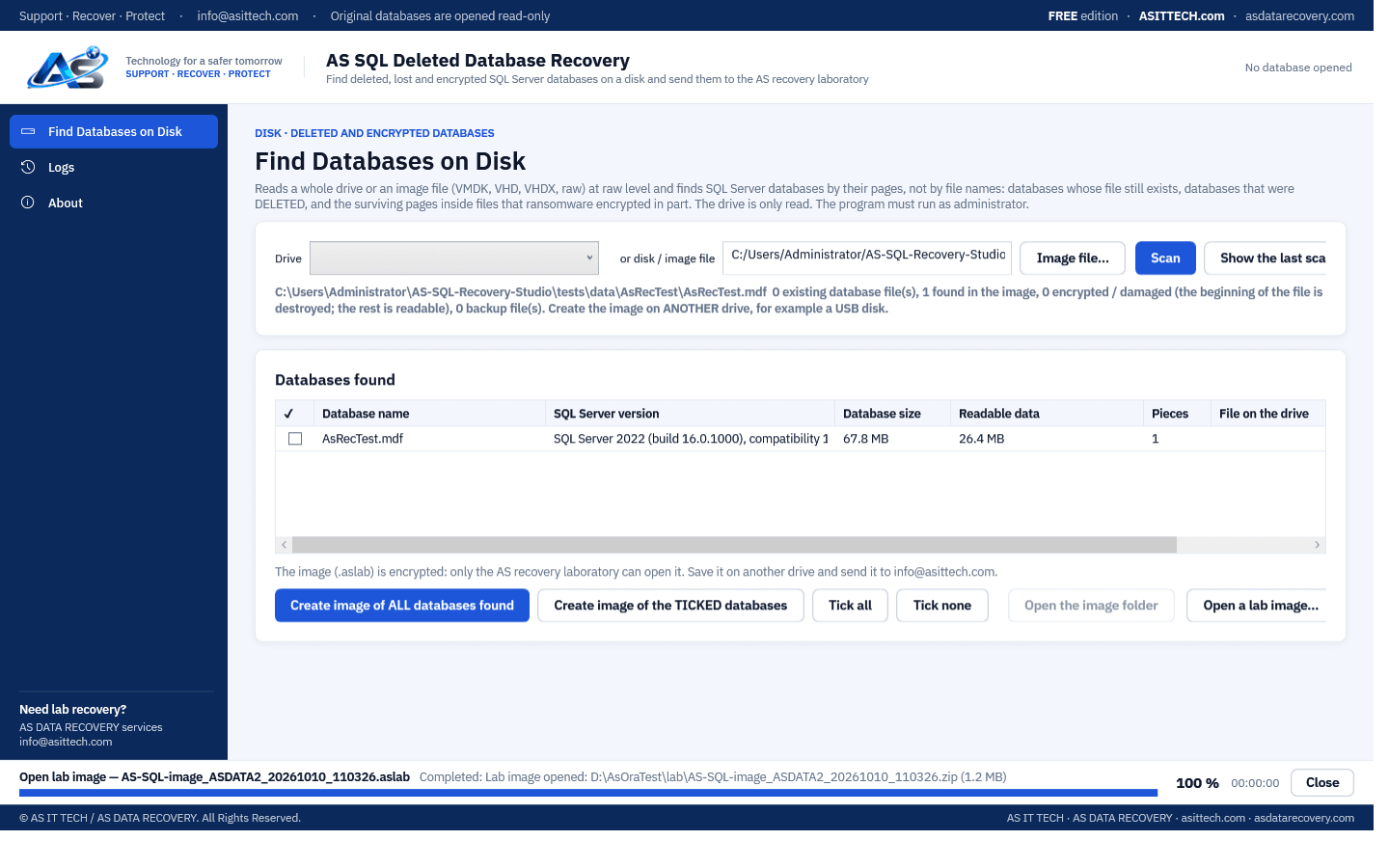
AS SQL Deleted Database Recovery is a free tool for customers of our recovery laboratory. It reads a whole drive, or a virtual disk file, from the first byte to the last and finds SQL Server databases by their 8 KB pages instead of by file names. It therefore also finds databases whose files were deleted, and the surviving part of files whose beginning ransomware encrypted. Every database found is listed with its name, SQL Server version and size; backup files are listed too. You tick what you need and the program writes it as one encrypted image (.aslab) on another drive. Only our laboratory can open that image: you send it to us, we assess what can be recovered and recover the data. The drive is only read, and the program is a single file that needs no installation, so nothing is written to the disk that holds the deleted data.
Physically failed media and complex incidents need a service engagement.
Database recovery servicesFeatures
- Raw scan of a drive or physical disk: every position a database page can start at is checked, independent of the file system
- Deleted databases: files that no longer exist on the volume are found by their pages and listed with the database's own name
- Ransomware-encrypted databases: when the beginning of the file was encrypted or overwritten, everything after it is collected
- Existing database files, also when SQL Server will not attach them or they are locked
- Image files as a source: VMware VMDK (sparse or flat), Hyper-V VHD and VHDX, and raw disk images
- Backup files on the drive (.bak / .trn / .dif), recognised by their header whatever the file name, and collected whole
- Database name, SQL Server version, build and compatibility level read from each database
- Hex view of the selected database: its pages shown byte by byte, read from the disk as they lie there
- Fragmented files: the pieces of an existing file are taken from the file system; pieces of a deleted file are joined by their page numbers
- Output on another drive only: one encrypted image (.aslab) with a report of the scan; only the AS recovery laboratory can open it
- The scan result is kept, so the list can be shown again without reading the drive a second time
- One portable signed program, no installation: copy it to a USB disk and run it on the server
Supported environments
- Windows 10 / 11, Windows Server 2016 or later (64-bit)
- SQL Server 2008 to 2022 data files; the version is read from each database
- NTFS volumes for telling existing and deleted files apart; any disk or image for the page scan itself
System requirements
- 64-bit Windows and administrator rights (a drive is read directly)
- A second drive, for example a USB disk, with free space for the image: the program refuses to write to the drive it scans
- On SSDs with TRIM the drive erases deleted files itself; nothing can be found there afterwards
- A database whose pages were overwritten by new files cannot be recovered: stop using the drive as soon as the loss is noticed
- Pages that ransomware encrypted are not decrypted; the surviving pages are collected
- Inside VMDK / VHD / VHDX image files only databases are found, not backup files, and existing and deleted databases are not told apart
Free edition
The program is free and has no time limit. It scans drives and image files, lists every database and backup file found with name, SQL Server version and size, and creates the encrypted image for our recovery laboratory. Opening the image and recovering the data is done by us as a recovery service: free assessment first, and no data, no charge.
Download free editionWindows installer, digitally signed by Srinivasan Krishnappa (AS Data Recovery). A new release can show Chrome's “uncommon download” warning until enough people have downloaded it — choose Keep. If Windows SmartScreen appears, click More info → Run anyway.
Documentation and support
User guide, activation instructions and release notes. Licensed customers can open support tickets from the portal.
Frequently asked questions
A SQL Server database was deleted and there is no backup. Can it be recovered?
Often, if the drive was not written to much afterwards. Deleting a file only removes its entry from the file system; the database pages stay on the disk until new files overwrite them. The program reads the disk directly, finds those pages and puts the data file together again. Run the free scan first: it shows which databases are still there.
What should I do right after a database was deleted?
Stop writing to that drive: do not install software on it, do not restore other backups onto it, and stop SQL Server if you can. Run this program from a USB disk and save the image to the USB disk or another drive.
Does it work on an SSD?
Only if TRIM did not run. Most SSDs erase the space of deleted files shortly after deletion, and then nothing is left to find. Hard disks, RAID volumes, SAN volumes and most virtual disks keep the data.
Can it find databases that ransomware encrypted?
Yes, when the ransomware encrypted only part of each file, which is common for large files. The program collects every page that survived. Encrypted pages are not decrypted.
Can it scan a VMware or Hyper-V virtual disk?
Yes. Choose the VMDK, VHD or VHDX file instead of a drive. Snapshot (delta) disks need their parent disk files in the same folder; VMware SEsparse snapshots are not supported.
What do I do with the image it creates?
Send it to us (info@asittech.com; for large files we give you an upload link). The image is encrypted and only our laboratory can open it. We check which databases and tables can be recovered and tell you before any chargeable work starts.
Is the tool really free? What does the recovery cost?
The tool is free. The recovery itself is a service: the assessment is free, you get a quote for the recovery, and if no data is recovered there is no charge.
Can I open the image myself?
No. The image is encrypted for our laboratory. To recover a database yourself, use AS SQL Recovery & Repair Studio on the database files.
Is the drive changed?
No. The drive is only read, the program needs no installation, and it refuses to save the image on the drive it is scanning.
How long does a scan take?
About as long as copying the whole drive: the program reads every sector once. A 25 GB virtual disk took a little over three minutes in our test; a multi-terabyte volume takes hours.
Prefer us to recover it for you?
Our lab has already solved 656+ ransomware and data recovery cases. Send us the files instead of running the software yourself: we tell you exactly what we can recover after a free assessment, and if we cannot recover your data, you do not pay.
- ✓ Free assessment before you pay anything
- ✓ No data, no charge
- ✓ NDA on request
Email: info [at] asittech.com · Mon–Fri, 9:00–18:00 IST