
AS SQL Recovery & Repair Studio — SQL Database (MDF) Recovery Software
Recover and repair damaged, corrupted and ransomware-encrypted SQL Server databases (MDF / NDF) — table by table, row by row.
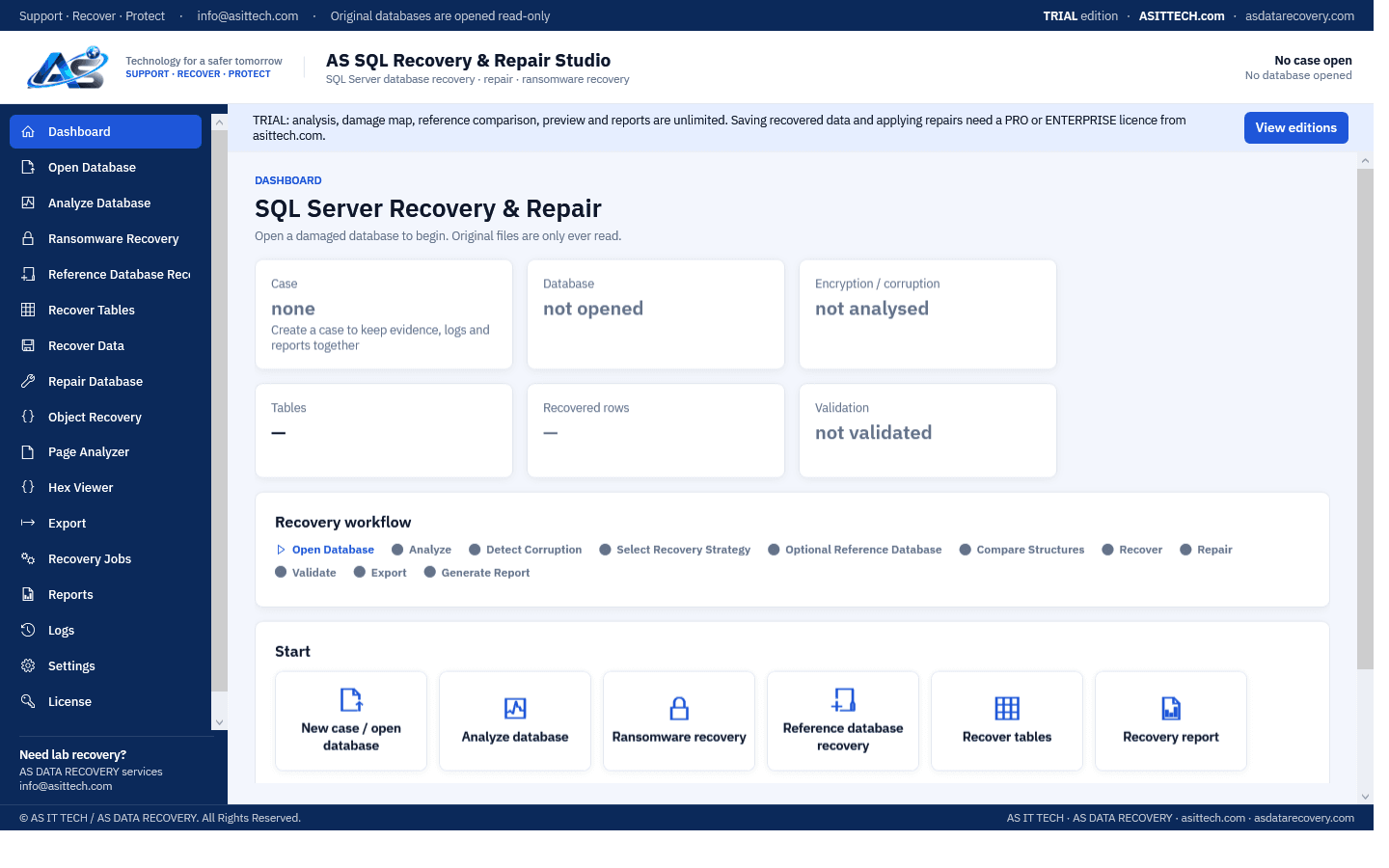
Overview
AS SQL Recovery & Repair Studio reads SQL Server data files directly — without SQL Server — and recovers what is still there when a database will not attach: after corruption, a damaged header or system catalog, or ransomware that encrypted part of the file. Every 8 KB page is classified, the damage is mapped, and tables are recovered row by row with every value checked; rows stored on destroyed pages are reported as missing, never invented. When the system catalog itself was destroyed, tables are re-linked and their column definitions rebuilt from the surviving metadata or from a reference database (an older copy of the same database, or one with the same schema) — the reference supplies structure only, never data. Recovered data goes to a new SQL Server database, scripts or CSV, and is validated (row counts, row hashes, DBCC CHECKDB). Original files are only ever read.
Physically failed media and complex incidents need a service engagement.
Database recovery servicesSee it work
Features
- Page-level analysis of MDF / NDF: intact, encrypted, zero and damaged pages, checksum errors, damage map
- Ransomware recovery: encrypted pages and appended footers detected; all surviving rows recovered
- System catalog repair: tables re-linked and column definitions rebuilt when sysallocunits / syscolpars / sysrscols are destroyed
- Reference database recovery: when the header and the system tables are destroyed, an older copy or a same-schema database supplies the structure, never its data; databases made from one template are matched exactly, including tables with identical columns
- Row-by-row table recovery including LOBs (text / ntext / image, varchar(max)), row-overflow, sql_variant and dropped columns
- Deleted rows and dropped tables: deleted records are recovered from free space, and a dropped table comes back with its name and columns, read from the deleted catalog rows
- Live database: a database that is in use on your SQL Server is opened read-only from a Windows snapshot, without downtime, to recover deleted rows or a dropped table
- Boot page and file header reconstruction so SQL Server can attach the database again
- Backup files (.bak) opened directly, plain or compressed, also when ransomware encrypted parts of them; backup to MDF conversion; repaired backup: a new .bak of the recovered database, written and verified by SQL Server
- Complete database on your SQL Server: tables with keys, indexes and identity columns, stored procedures, functions, triggers, views and table types, in the original collation; what the damaged file no longer holds is completed from the reference database and marked as such
- Add only the missing rows to a database that is already on the server: rows already there are skipped, and parent / child links (foreign keys) and indexes are switched off for the insert and checked again afterwards
- SQL Server tools: attach an MDF with or without its LDF, restore a BAK, switch a database's keys and indexes off and on again, reindex all tables
- SQL Query page: run SELECT statements with WHERE, GROUP BY and ORDER BY over the tables of the damaged database, and read the definitions of its stored procedures, functions, triggers and views
- Export to a new database on your SQL Server, or to SQL scripts, CSV or JSON, with validation (row counts, row hashes, DBCC CHECKDB) and reports
Supported environments
- Windows 10 / 11, Windows Server 2012 R2 or later (64-bit)
- SQL Server 2008 to 2022 data files (version read from each file)
- Tested on real ransomware cases: a 27 GB SQL Server 2008 R2 database (96 million rows from 222 tables recovered), LockBit-encrypted SQL Server 2019 backups (98.8% of rows, checked against a healthy copy) and an 85%-encrypted 1C database
System requirements
- 64-bit Windows
- A SQL Server instance (any edition, Express included) only for writing the recovered database and validating it
- Free disk space for the recovered data
- Administrator rights for the live-database snapshot
- Rows on pages the ransomware encrypted cannot be recovered without the decryption key — they are reported, not invented
Pricing
Choose an edition. Licences are delivered instantly after payment and managed in your customer portal.
Professional
Full recovery and repair for one technician on one computer, for databases of up to 200 GB.
$4,300
+ 18% GST
1 computer · One-year licence, including updates during the term. Renewal is 60% of the current price. Prices plus 18% GST.
Buy nowEnterprise
Everything in Professional with no size limit, plus advanced repair and the command-line batch tool, for up to five computers and commercial recovery work.
Price on request
5 computers · One-year licence, including updates during the term. Renewal is 60% of the current price. Prices plus 18% GST.
Request a quoteFree edition
The free edition has no time limit: analysis, damage map, reference comparison, preview of the recoverable tables and rows, and reports, and it exports the first 25 rows of every table into a new database or CSV files, so you can check the real recovered data before you buy. Exporting all rows and applying repairs require a Professional or Enterprise licence. The Professional licence recovers databases of up to 200 GB (all files of the database together, or the backup file); larger databases need the Enterprise edition: please contact us at info@asittech.com. Activate it in the program with the licence key from your order.
Download free editionWindows installer, digitally signed by Srinivasan Krishnappa (AS Data Recovery). A new release can show Chrome's “uncommon download” warning until enough people have downloaded it — choose Keep. If Windows SmartScreen appears, click More info → Run anyway.
Documentation and support
User guide, activation instructions and release notes. Licensed customers can open support tickets from the portal.
Frequently asked questions
Is this an MDF file repair tool?
Yes. For MDF file repair it reads the damaged file page by page, shows which tables and rows are intact and writes the recovered data to a new database on your SQL Server. It can also rebuild a destroyed boot page and file header so that SQL Server attaches the file again.
How do I recover a deleted SQL database?
If the database files were deleted from the disk, stop writing to that drive. Our free tool AS SQL Deleted Database Recovery scans the drive for the deleted database and packs it for our laboratory. If rows or a table were deleted inside a database that still exists, this program recovers them from the data file.
My SQL database is suspect, or shows SQL Server recovery pending. What should I do?
Copy the MDF, NDF and LDF files first, before any repair command. Then open the copy in the free edition: the database does not have to come online, and you see what can be recovered. A SQL database suspect state or SQL Server recovery pending usually means damaged pages, or a damaged or missing log file.
Does it do BAK file recovery?
Yes. For BAK file recovery the backup file is opened directly, plain or compressed, also when part of it is damaged or encrypted. You can recover tables from it or convert the backup to an MDF.
My SQL database is corrupted and DBCC CHECKDB reports errors. Can the data be saved?
Usually most of it. When a SQL database is corrupted the damage is normally limited to some pages, and the rows on all other pages are read directly from the file. Run the free analysis before any repair that allows data loss.
How do I repair a corrupt MDF file without a backup?
Copy the MDF (and any NDF files) to another disk and open the copy in the free edition. It classifies every page, shows the damage map and previews the tables and rows that can be recovered. With a licence the recovered data is written to a new SQL Server database, SQL scripts or CSV. The original file is only ever read.
My database is in SUSPECT or RECOVERY_PENDING state. Can it help?
Yes. The program reads the MDF / NDF files directly, so the database does not have to attach or come online. Take a copy of the files first, then analyse the copy to see which tables and rows are intact.
Should I run DBCC CHECKDB with REPAIR_ALLOW_DATA_LOSS first?
Not before you have a copy of the files. That option repairs the database by deleting damaged pages, and the rows on them are gone afterwards. Reading the file page by page first shows what is recoverable without changing anything.
Can it recover deleted rows?
Often. Deleted records are recovered from free space inside the data file, as long as SQL Server has not reused that space. The sooner the file is copied after the deletion, the more is found.
Someone deleted a table or rows in a database that is still running. Can it get them back?
Often. On the SQL Server Tools page choose the database: the program reads it from a Windows snapshot, so the database stays online and nothing is written to it. A dropped table is found with its name and columns, and deleted rows are recovered from free space, as long as SQL Server has not reused that space. Do it as soon as possible after the mistake.
The same database is already on my SQL Server. Can it add only the rows that are missing?
Yes. Choose "Add only the missing rows" when exporting: rows that are already in the table (same primary key) are skipped, nothing is replaced or deleted, and foreign keys are switched off for the insert and checked again afterwards.
I only have the MDF file, the LDF is lost. Can it be attached?
Yes. On the SQL Server Tools page the data file is attached without its log file and SQL Server builds a new one. If SQL Server refuses, the file is opened directly and its tables are recovered instead.
Does it need SQL Server to recover data?
No — the data files are read directly. SQL Server (any edition, Express included) is only used to write the recovered data into a new database and validate it.
Can it recover a database encrypted by ransomware?
Very often, partly or largely: many ransomware families encrypt only parts of large files. The program finds which pages are encrypted and recovers every row on the pages that survived. Rows on encrypted pages cannot be recovered without the key; they are listed as missing, never invented.
Can it open an MDF or BAK file renamed by ransomware (.lockbit, .akira and others)?
Yes. The program recognises SQL Server data and backup files by their content, not by their name, so files with an added ransomware extension open like any other. Do not rename or move the originals; work on copies.
Can it recover a ransomware-encrypted .bak backup?
Often. The backup is searched directly for every page image that is still intact, verified by its checksum, so a destroyed backup header does not stop it, and compressed backups are decoded too. On real LockBit-encrypted SQL Server 2019 backups it recovered 4,703,039 of 4,759,135 rows (98.8%), checked against a healthy copy of the same database.
Which ransomware families does it handle?
It does not depend on the family: it measures which pages of each file are still intact and recovers the rows on them. We have used it on real files encrypted by LockBit, The Gentlemen, M142HIMARS and others. Rows on pages that were encrypted cannot be recovered without the attacker's key, and the program says so instead of guessing.
What is a reference database for?
When the system catalog (the list of tables and their columns) was destroyed, an older copy of the same database — or one with the same schema — supplies that structure. Its data is never used as the customer's data.
Is the original database file changed?
No. Original files are only ever read; recovered data is written to a new database, scripts or CSV.
Which SQL Server versions are supported?
SQL Server 2008 to 2022 data files. The version is read from the file itself and shown in the analysis.
How do I activate after buying?
Your licence key (ASSQ-…) arrives by e-mail and in your account. Open Licence in the program, paste the key and click Activate.
Prefer us to recover it for you?
Our lab has already solved 656+ ransomware and data recovery cases. Send us the files instead of running the software yourself: we tell you exactly what we can recover after a free assessment, and if we cannot recover your data, you do not pay.
- ✓ Free assessment before you pay anything
- ✓ No data, no charge
- ✓ NDA on request
Email: info [at] asittech.com · Mon–Fri, 9:00–18:00 IST